Once you have started your way through linux, you might come across numerous applications which are being developed and released everyday. You might me interested in some and you might not.So, you arrive to an ultimate question “What are the apps that will increase my productivity?. Well, the answer is in this article which consists of apps from various categories like developer tools, multimedia, sound&video, internet, etc., and form a blend of useful software which I’m sure will be of great use for the user and suffice the needs. Lets take a look at some of the best apps in its category to increase the productivity.
Graphics/Designs

Gimp is a open source program which can be of great use whose applications include simple painting, quality photo retouching, online batch processing system, image renderer, image format converter and so on. GIMP is expandable and extensible. It is designed to do anything the user demands.
sudo apt-get install gimp

MyPaint is a fast and easy open-source graphics application for digital painters. It lets you focus on the art instead of the program. You work on your painting with minimum distractions, bringing up the interface only when you need it.
sudo apt-get install mypaint

Kolourpaint is a simple drawing and image edititing application for kde. It aims to providing a level of functionality targeted towards average user. It is ideal for common tasks such as drawing simple graphics and touching up photos.
sudo apt-get install kolourpaint4
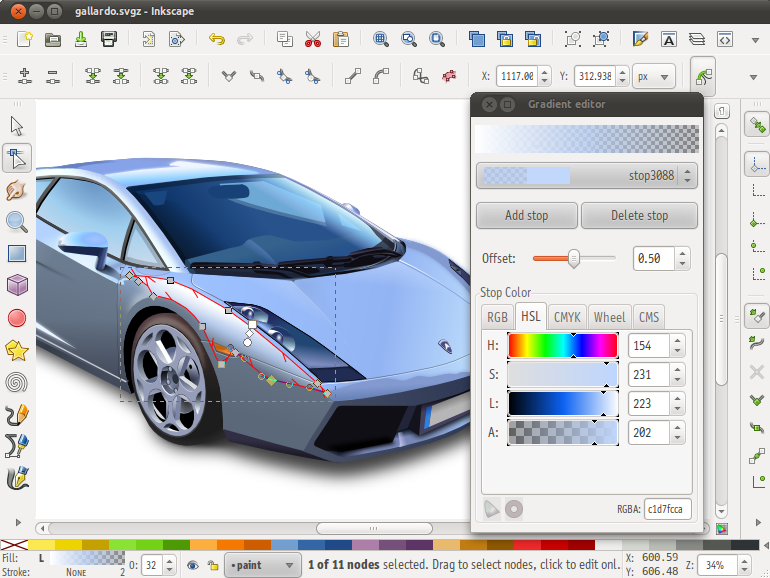
An Open Source vector graphics editor with capabilities similar to Illustrator, CorelDraw, or Xara X, using the W3C standard Scalable Vector Graphics (SVG) file format. Inkscape supports many advanced SVG features (markers, clones, alpha blending, etc.).
sudo apt-get install inkscape
Blender is an integrated 3d suite for modelling,animation,rendering,post-production,interactive creation and playback(games). Blender has its own UI, which is implemented in openGL which was designed with speed in mind.

sudo apt-get install blender
Developer tools (IDE’s)
Geany is a text editor using the GTK2 toolkit which has the basic features of an IDE. It was developed to provide a small and fast IDE. It supports many filetypes and providers many features for developers.

sudo apt-get install geany

Netbeans is an efficient IDE for developing desktop, mobile and web applications with Java, PHP, C/C++ and more.
Sudo apt-get install netbeans

Idle is a simple ,yet powerful IDE for developing tools using Python. It can installed from terminal using the command.
sudo apt-get install idle

Scribes is a text editor which focuses on easing the workflow by automating the common and repetitive operations by eliminating the factors that prevent you from focusing on your tasks.
sudo apt-get install scribes

Bluefish is a powerful editor targeted towards programmers and web-developers, with many options to write websites, scripts and programming code. Bluefish supports many programming and markup languages. Bluefish is an open source development project, released under the GNU GPL licence.It can installed from terminal using the command,
sudo apt-get install bluefish
Internet Tools

Chromium is an open-source browser project that aims to build a safer, faster, and more stable way for all users to experience the web.
sudo add-apt-repository ppa:chromium-daily/stable
FileZilla Client is a fast and reliable cross-platform FTP, FTPS and SFTP client with lots of features and an interactive graphical user interface.

sudo apt-get install filezilla

Qbit Torrent is a torrent client which is used to download torrent files which has an easy to use interface and provides great flexibility for the users.
sudo apt-get install qbittorrent

Steadyflow is a GTK+ based download manager that aims for a easy to control downloading of data from the internet.
sudo apt-get install steadyflow

Postr is a Flickr uploading tool for the GNOME desktop, which aims to be simple to use but exposing enough of Flickr to be useful.
sudo apt-get install postr
Online Readers

Calibre is a free and open source e-book library management application developed by users of e-books for users of e-books.
sudo apt-get install calibre

Liferea is a simple feedreader clone for gnome which stands for “Linux Feed Reader” .It is a reader for rss/fdf feeds which also supports cdf channels, atom/echo/pie feeds and ocs directories.
sudo apt-get install liferea

Comix is comic book viewer. It reads zip,rar,tar,tar.gz,tar.bz2 archives as well as normal image files and its written in python with simple UI.
sudo apt-get install comix
Media Tools

OpenShot Video Editor is a free, open-source video editor for Linux. OpenShot can take videos, photos, and music files and helpcreate the film you have always dreamed of. Easily add sub-titles, transition effects, and then export your film to DVD, YouTube, Vimeo, Xbox 360, and many other common formats.
sudo apt-get install openshot

SM Player is a media player with basic features like playing videos, DVDs, and VCDs to more advanced features like support for MPlayer filters and more. One of the most interesting features of SMPlayer is that it remembers the settings of all files you play.
sudo apt-get install smplayer
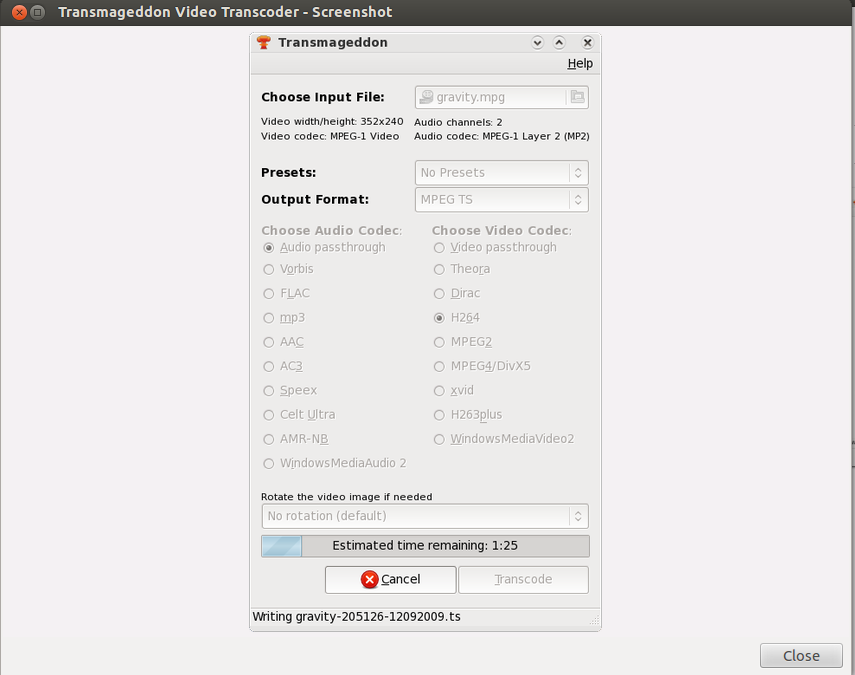
Transmageddon is a video transcoder for Linux and Unix systems built using GStreamer. It supports almost any format as its input and can generate a very large host of output files.
sudo apt-get install transmageddon
Audacity is a free, easy to use and multilingual audio editor and recorder for variety of platforms. Audacity is used to record live audio, convert tapes and records into digital recordings or CDs, edit sound formats and digitally mix them together.
sudo apt-get install audacity

Arista is a wonderful application which is used to convert media.It supports all the media formats and converts media for many devices.

sudo apt-get install arista
Miscellaneous Desktop Utilities

Shutter is a screenshot program with which you can take a screenshot of a specific area, window, your whole screen, or even of a website and apply different effects to it, draw on it to highlight points all within one window. Shutter is free, open-source, and licensed under GPL v3.
sudo apt-get install shutter

Virtualbox is a free x86 virtualization software allowing a wide range of x86 operating systems such as windows, dos,bsd or linux to run on a linux system. It provides QT based GUI for virtual box.
sudo apt-get install virtualbox

Unetbootin is a open source tool which allows users a way for the installation of various linux/bsd distributions to a partition or usb drive, so its no different from a standard install , only it doesnt need a cd. It can create a dual boot intsall or replace existing OS entirely.
sudo apt-get install unetbootin

Stellarium is a free open source planetarium for your computer. It shows a realistic sky in 3D, just like what you see with the naked eye, binoculars or a telescope. It is being used in planetarium projectors. To start working with it just set your coordinates and go.
sudo apt-get install stellarium
28
Furius ISO Mount
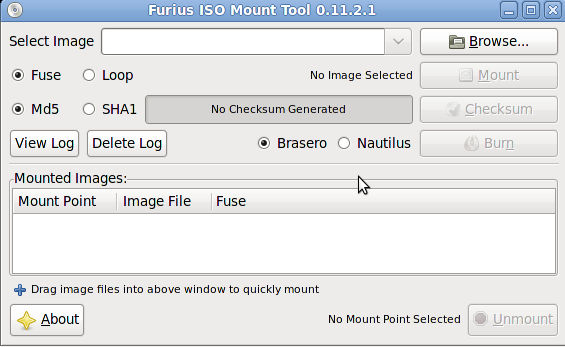
Furius ISO mount is a simple Gtk+ interface to mount iso,nrg,bin,mdf image files without burning to disk.
sudo apt-get install furiusisomount
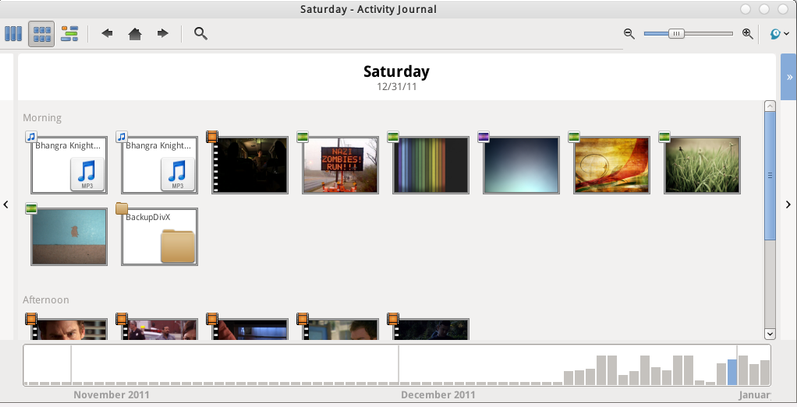
GNOME Activity Journal is a tool for easily browsing and finding files on your computer. It keeps a chronological journal of all file activity and supports tagging and establishing relationships between groups of files.
sudo add-apt-repository ppa:zeitgeist/ppa
Gparted is a disk management tool which is used to detect and manipulate devices and form partition table based on the user needs.

sudo apt-get install gparted
Guake is a drop-down terminal for gnome desktop so you just need to press a key to invoke him and press again to hide.

sudo apt-get install guake
Back In Time is a simple backup tool for Linux. The backup is done by taking snapshots of a specified set of directories. Currently there are two GUI versions available: Gnome and KDE.
sudo add-apt-repository ppa:bit-team/stable


Dropbox is a file hosting service operated by Dropbox, Inc. that offers cloud storage, file synchronization, and client software. In simple terms, with Dropbox users can create a special folder on each of their computers, which Dropbox then synchronises so that it appears to be the same folder regardless of the computer it is viewed on. Files placed in this folder are also accessible through a web site and mobile phone applications.
The Dropbox daemon works fine on all 32-bit and 64-bit Linux servers. To install, run the following command in your Linux terminal.
32-bit:
cd ~ && wget -O - "https://www.dropbox.com/download?plat=lnx.x86" | tar xzf -
64-bit:
cd ~ && wget -O - "https://www.dropbox.com/download?plat=lnx.x86_64" | tar xzf -

Espeak is a speech synthesizer which is used to convert text to speech. The speech is clear, and can be used at high speeds, but is not as natural or smooth as larger synthesizers which are based on human speech recordings.
sudo apt-get install espeak

Firewall Config is an easy, intuitive way to manage your Ubuntu firewall, powered by ufw. It does common tasks such as allowing or blocking pre-configured services, common P2P, or individual IP/port(s), and so on.

Sysinfo is a simple GNU/Linux program which displays some computer/system information.
sudo apt-get install sysinfo

Wine is a program that offers a compatibility layer allowing Linux users to run some Windows-native applications inside of Linux. Wine is not the ideal. Ideally, you should find native Linux applications.
sudo apt-get install wine1.5
Feedback
Hope you find this collection useful. We have collected the best software in each category. In this list we neglected some apps which are pre-installed with Ubuntu such as VLC player, LibreOffice, etc. Please let us know via comments if we missed any apps which you found very useful, We will include them in this list.
About the author /
admin
Popular


Editor’s Pick
-
January 11, 2010 Ultimate Twitter Tools and resources
Twitter, the micro-blogging platform that has taken the Internet by storm, has so much to offer the online entrepreneur or personal user, yet is misunderstood by many people. Twitter not only allows you to tell the world “what I am doing right now” via its web interface, but can also be integrated and enhanced by…
-
April 28, 2023 React Lazy Loading and Suspense: Boost Performance & UX
Learn how to improve your React app’s performance and user experience by implementing lazy loading and suspense. Discover the benefits and best practices of using these features for faster page load times and smoother user interactions.
-
January 11, 2010 How to Remove Author Name From Blogger Posts
If you are running multiple blogs and for some reason you don’t want to show your name in author field, Then this Blogger hack is for you. Though the topic looks very simple , but most don’t know how do this. So in this tutorial , I will explain how to remove the author name…
-
September 21, 2009 150+ amazing Photo Manipulations for professional photographers
-
April 30, 2023 Maximizing Performance with useLayoutEffect React Hook
Discover how to optimize your React apps with our comprehensive guide on ‘Maximizing Performance with useLayoutEffect React Hook’. Learn how to leverage this powerful hook for efficient DOM manipulation, eliminating visual glitches, and creating smoother transitions. Ideal for both novice and expert React developers.