Yo Fellas! Hope you are having a great time.I have been busy with server migration and web design works lately. At last i have got some time to write a quick post. In this post, I am looking to distribute my another Blogger template called “9Gag Clone”. Yes, as the name suggests its a 9gag.com clone. I have tried to rip all the cool features of 9gag. Still I don’t think many would be thinking to have that sort of a site on blogger. However, Of course you can do so but still blogger isn’t so powerful still. I probably guess, it will get all those CMS features very sooner. Let’s see the template features and tips to customize the template work for you.

9Gag Blogger Theme
Features of 9Gag blogger theme
- 3 different Header styles
- Automatic Featured Posts
- Automatic Featured Posts
- Widget ready sidebars
- Automatic thumbnail creator
- Read More hack
- Page Navigation Widget
- Subscription box
- Favicon Included
- Comment form enabled
- Author comments new style
- Gravatar ready – Author
- Advertisement Ready
Header Style
This template has got three different header styles. In the home page, you can have the featured posts listed with thumbnails. And in the post pages, you can either show up a list of category links or you can even show Adsense or any other network ad below the title.



I will distribute all three versions of it. You can download anyone which suits you.
Related Posts with Ad
We have implemented a better way to display the related posts widget along with ad. To insert your Ad code, Go to EDIT HTML page of your template and click “Expand widgets” check box.
Then search for the following code :
<br /> <img style="background: none; border: none;" src="https://smashingtips.com/wp-content/uploads/2012/06/300x300.gif" alt="" /><br />
Replace this code with either encoded adsense code or Banner image.

Post Title with Social Media icons

Post Thumbnail Size Management

By default, I have set the image size used in 9gag site. But if you want to use this template for a tech blog and want to customize the image size width. Then you can do that by editing the following code in your template.
Go to EDIT HTML page of the template. And look for the following code.
<br /> <script type="text/javascript">// <![CDATA[</p> <p>var thumbnail_mode = &quot;float&quot;;<br /> summary_noimg = 500;<br /> summary_img = 250;<br /> img_thumb_height = 340;<br /> img_thumb_width =460;<br /> // ]]></script><br /> <script type="text/javascript" src="https://smashingtips.com/blogger/readmore.js">// <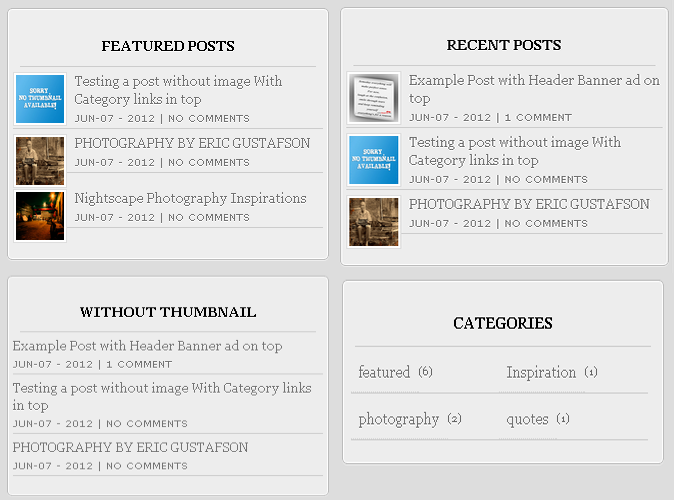
To include the widgets in your template, Please follow the steps mentioned here.
Let us take a look at the code for showing recent posts :
<br /> <script style='text/javascript' src='https://smashingtips.com/blogger/recent.js'><br /> // ]]></script><script type="text/javascript">// <![CDATA[<br /> var numposts = 5;<br /> var showpostthumbnails = true;<br /> var displayseparator = true;<br /> var showcommentnum = true;<br /> var showpostdate = true;<br /> // ]]></script><br /> <script type="text/javascript" src="http://domain.blogspot.com/feeds/posts/default?orderby=published&alt=json-in-script&callback=recent"></script><br />
In this change , domain name to your blog domain name.
<script type="text/javascript" src="https://smashingtips.com/feeds/posts/default?orderby=published&alt=json-in-script&callback=recent"></script>
For showing posts from particular category :
Change the last line in the code to this.
<br /> <script type="text/javascript" src="http://domain.blogspot.com/feeds/posts/default/-/featured?orderby=published&alt=json-in-script&callback=recent"></script>
Here change the domain name and “featured” to the label name.
For more customization, please check the other post “Show Recent Posts With Thumbnail from Particular Label/Category in Blogger”
Download 9gag Blogger Template
I have listed all 2 versions of the template, pick the one you like.


About the author /
Mohamed Rias
Popular


Editor’s Pick
-
April 23, 2023 Exploring the Wonders of Gigapixel Photography: How to Achieve Stunning Detail and Clarity in Your Images
Gigapixel photography is a technique that captures images with incredibly high resolution and detail, allowing for stunningly clear and vibrant pictures that are perfect for printing or displaying on large screens. In this article, we’ll explore some tips and techniques you can use to achieve amazing results with gigapixel photography. Definition of gigapixel photography Gigapixel…
-
April 25, 2023 WhatsApp Multiple Device Log-in: Simplify Staying Connected Across Devices
WhatsApp, which is a widely used messaging platform, is introducing a game-changing feature that will allow users to log into their WhatsApp account on multiple devices. This much-awaited update aims to simplify staying connected across devices by making it easier for users to maintain their chats. In this comprehensive guide, we will explore the benefits…
-
December 15, 2010 35+ Inspiring Nightscape photography and Tips
Nightscape Photography is one of the eluding styles of photography in lines of selection of photography-style by a photographer. It is sometime possible to shoot Landscape panorama, sea views, and bridges at night in such a manner as if, it has been taken at day time. A cityscape at night with lights blazing away like…
-
January 24, 2010 10 useful Greasemonkey scripts for Flickr power users
Flickr is one of the best photo sharing and hosting site which is widely used by many photographers and designers. In order to make the navigation in flickr easy, I have collected some of the useful Greasemonkey scripts for firefox users. Userscripts are add-ons for the Firefox web browser, which dynamically enhance the communication and…
-
May 2, 2023 Implementing SOLID Principles in Your React Frontend Development
Learn how to improve the maintainability and scalability of your React frontend applications by implementing the SOLID principles. From Single Responsibility to Dependency Inversion, this article covers practical examples and best practices for writing cleaner, more modular code in your React codebase. Join us on this journey towards better frontend development with Implementing SOLID Principles in Your React Frontend Development.